
All mobile builds// design build

Casement

Real estate & proptech

Capture the property. Publish from the kerb.

What this is

  • A design build, not a compiled app. Casement is a screen set plus a target architecture. The screens are hand-built and captured; no Swift or Kotlin source exists behind them, and it is not on a store.
  • Nobody commissioned it. We designed it in-house to show how we approach native mobile. It is not a client engagement — paid client work sits on the portfolio.
  • Every name, record and figure in these screens is fictional. All of it was invented as demo data.

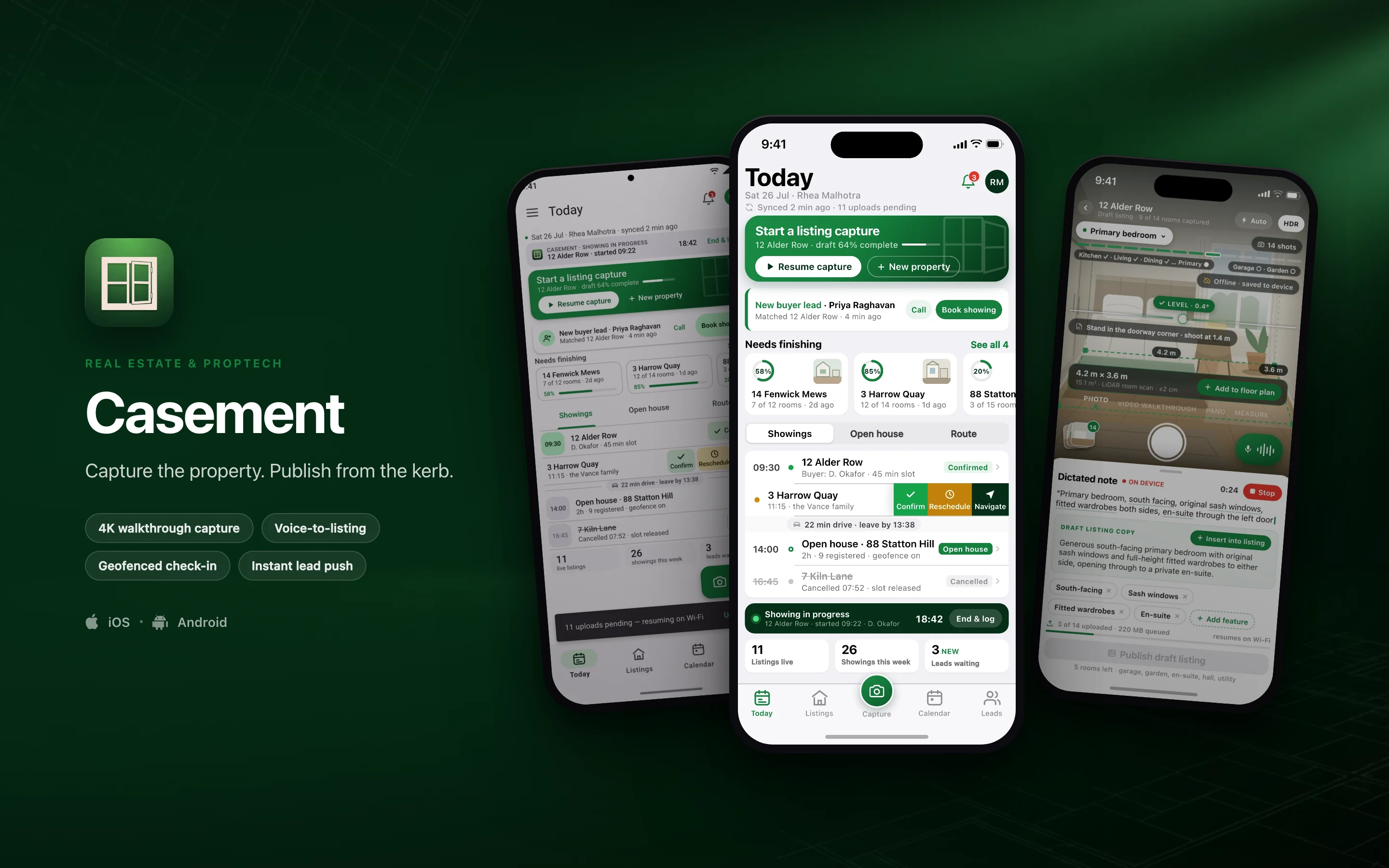
Casement is a native iPhone and Android app for listing agents. You walk a property, capture it room by room, dictate the notes that become the listing copy, and publish a draft before you leave the kerb — then run showings, geofenced open-house check-in and buyer leads out of the same app. It is built for the agent working alone in an empty house with one hand on a phone, not for a desk.

  • 4K walkthrough capture
  • Voice-to-listing
  • Geofenced check-in
  • Instant lead push
Casement shown on three phones — Today, Room capture, 12 Alder Row, Today, rebuilt in Material 3 — on a real estate & proptech brand backdrop
// platforms

Two native designs, one shared core

Casement is designed twice — once in the iOS idiom and once in Material 3 — rather than one layout wrapped twice for both stores.

DimensioniOSAndroid
Specced againstSwift · SwiftUIKotlin · Jetpack Compose
Design languageThe Apple platform idiomMaterial 3, redesigned rather than skinned
Screens in this set21
// screens

3 screens, taken far enough to be judged

2 in the iOS idiom and 1 redesigned in Material 3 — the same feature rebuilt, not the same layout skinned. Everything inside the frames is fictional demo data.

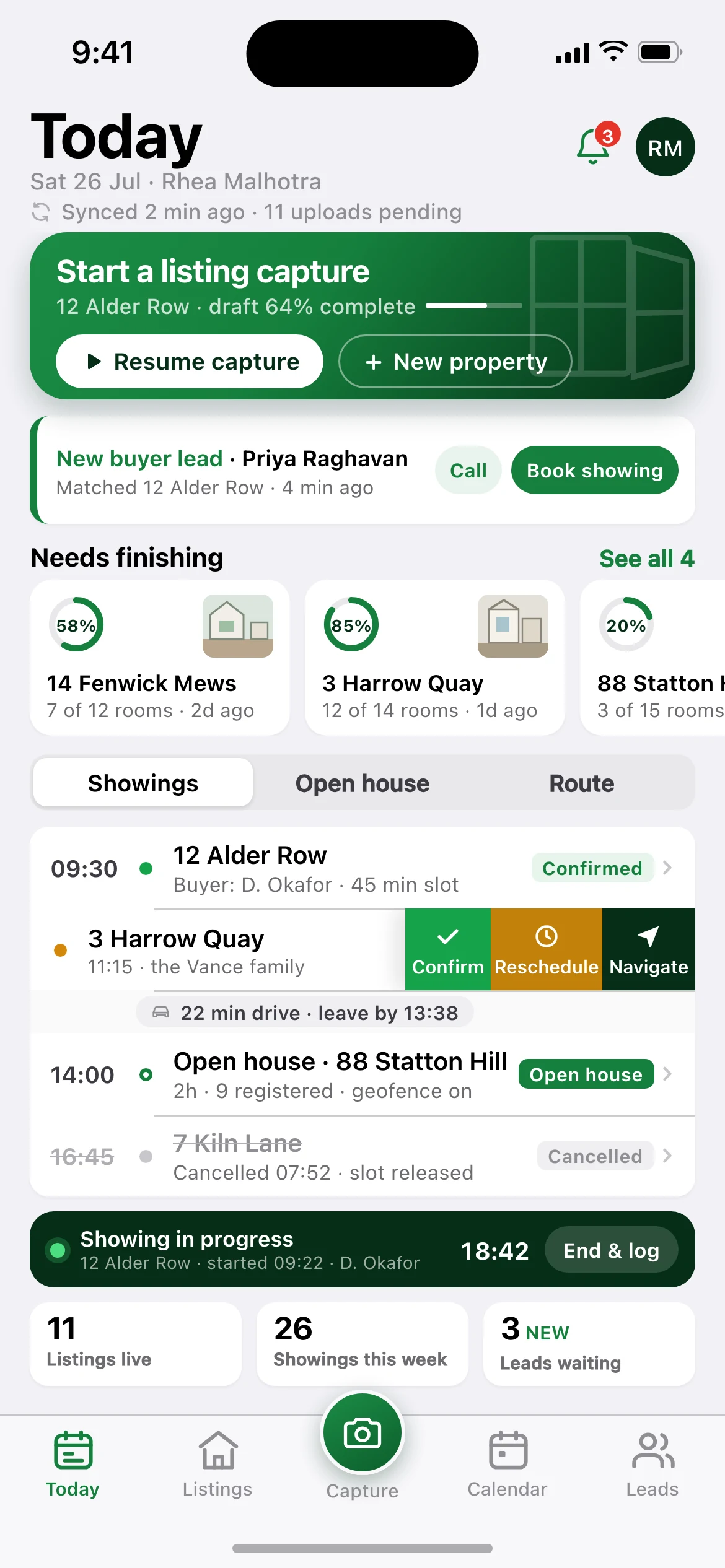
Casement — the Today screen, running on iOS
01iOS

Today

The 7am screen: hero capture card for the half-finished draft at 12 Alder Row, an overnight buyer lead, a "needs finishing" carousel of three drafts with progress rings, and the day's showings as a grouped inset list with a drive-time chip, a swiped row showing the Confirm / Reschedule / Navigate actions, the running Live Activity, and a three-tile stat strip.
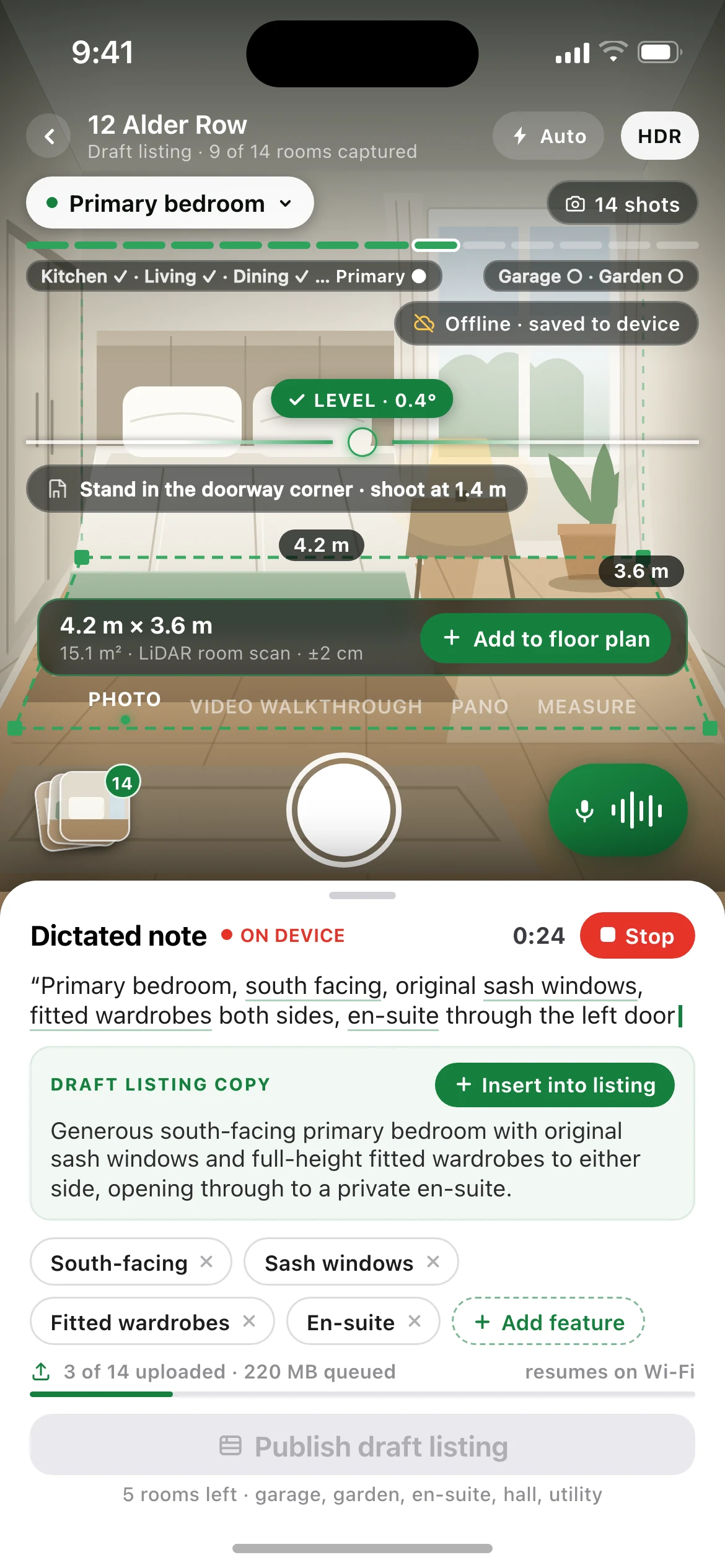
Casement — the Room capture, 12 Alder Row screen, running on iOS
02iOS

Room capture, 12 Alder Row

The screen the agent stands in the room with:

full-bleed viewfinder over the staged primary bedroom, horizon guide reading level, room progress rail, LiDAR measure overlay, capture cluster, and the dictation sheet at its medium detent carrying the live transcript, the draft listing copy, extracted feature chips and the upload queue.

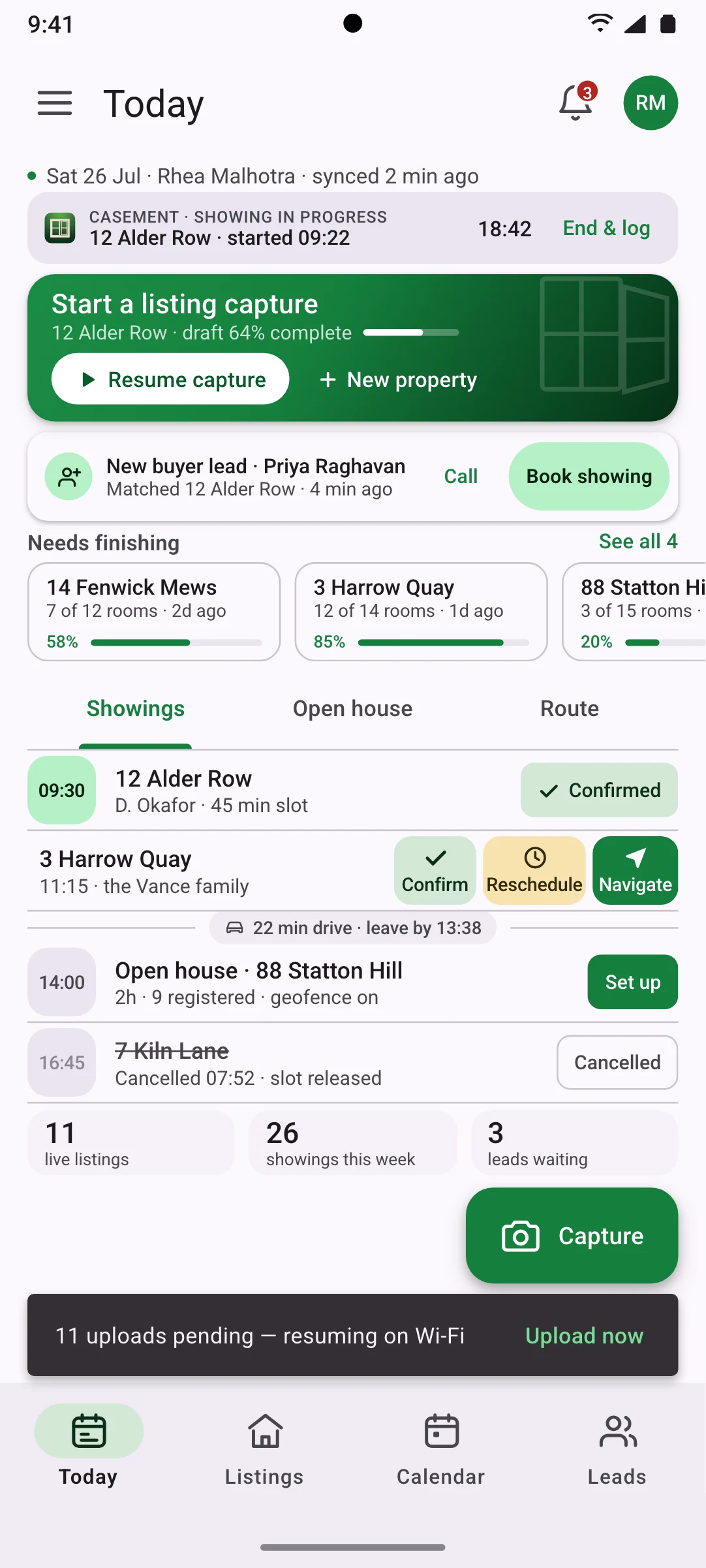
Casement — the Today, rebuilt in Material 3 screen, running on Android
03Android

Today, rebuilt in Material 3

The same day, the same records and the same numbers as the iOS home screen, expressed in Android idioms:

top app bar and supporting text, filled and elevated cards, outlined draft cards with linear progress, primary tabs, list items with leading time badges and trailing assist chips, tonal swipe actions, an extended FAB for capture, a snackbar for the pending uploads and a navigation bar with a pill indicator.

// why native

Why a wrapped web app cannot do this

6 capabilities Casement is designed around. Each is an operating-system entitlement or a hardware path a browser tab either cannot reach or cannot be trusted to hold.

Design intent, not shipped implementation. Each line describes the target architecture this build is specced against.

Dual capture pipeline
AVFoundation and CameraX drive per-room presets, HDR bracketing and 4K60 walkthrough video, with a live horizon guide fed by CoreMotion / SensorManager so every room shot lands square to the wall. The web camera API gives you a frame grab and nothing else.
In-place room measurement
ARKit RoomPlan on LiDAR iPhones and ARCore Depth on Android measure the room where the agent is standing (4.2 m × 3.6 m, 15.1 m²) and assemble a floor-plan scaffold. There is no browser equivalent to the depth sensor.
Speech recognition that works with no signal
SFSpeechRecognizer and Android SpeechRecognizer keep transcribing in a basement or a stone-walled cottage; the dictated note turns into draft listing copy on-device, offline.
Resumable multi-gigabyte uploads
URLSession background transfer and WorkManager with a foreground service push a capture set up over hours, honouring a Wi-Fi-only policy, a cellular budget cap and battery-aware scheduling. A backgrounded browser tab is suspended and loses the transfer.
Geofenced open-house check-in
CoreLocation region monitoring and the Android Geofencing API wake the app on arrival and open visitor check-in, with NFC tap and QR badge fallback and a signed on-device visitor log.
Time-sensitive delivery and a live showing
Time-sensitive APNs and high-priority FCM land a buyer lead through a Focus mode; an iOS Live Activity in the Dynamic Island and an Android ongoing notification hold the running showing timer; EventKit and CalendarProvider sync showings both ways into the agent's own calendar.
// stack

The stack it is specced against, chosen per constraint

Swift and SwiftUI on iOS, Kotlin and Jetpack Compose on Android, with the domain logic written once and consumed by both. A target architecture, not a shipped dependency list.

The full target architecture, all 8 lines
  1. Swift 6 and SwiftUI on iOS 18, with UIKit interop for the custom capture viewfinder and Live Activities via ActivityKit
  2. Kotlin 2.2 and Jetpack Compose with Material 3 expressive on Android 15, edge-to-edge and predictive back
  3. Kotlin Multiplatform shared layer for the domain model, sync engine, offline mutation queue and listing-copy assembly
  4. AVFoundation + ARKit RoomPlan on iOS, CameraX + ARCore Depth on Android, for capture, levelling and in-place room measurement
  5. SQLDelight offline-first local store with resumable transfer scheduling through BGTaskScheduler and WorkManager
  6. Go services on Cloud Run behind Postgres + PostGIS for geofences and routing, object storage with signed URLs, FFmpeg transcode ladder for walkthrough video
  7. RESO Web API connectors for two-way MLS and CRM listing sync, with a mapping layer per board
  8. APNs and FCM for time-sensitive lead delivery, EventKit and CalendarProvider for two-way showings calendar sync
// next

Working on something shaped like this?

Casement is a design build, so there is nothing to buy on this page. If your team has a problem that needs this kind of depth — offline for a full shift, real sensors, work that has to happen with the screen off — tell us about it and we will tell you honestly whether we are the right people to build it.