All mobile builds// design build

Kickplate

Manufacturing & heavy industry — plant-floor safety, EHS and incident management

See the hazard before the photo is filed.

What this is

  • A design build, not a compiled app. Kickplate is a screen set plus a target architecture. The screens are hand-built and captured; no Swift or Kotlin source exists behind them, and it is not on a store.
  • Nobody commissioned it. We designed it in-house to show how we approach native mobile. It is not a client engagement — paid client work sits on the portfolio.
  • Every name, record and figure in these screens is fictional. All of it was invented as demo data.

Kickplate is a camera-first safety-walk app for plant supervisors and EHS leads in manufacturing and heavy industry. A supervisor walks a fixed route, taps a station tag to bind the capture to the machine they are standing at, and works a structured checklist while an on-device vision model reads the live viewfinder and flags missing PPE, blocked egress and exposed guards before the shutter is ever pressed. Anything it finds becomes a severity-rated incident that is assigned, due-dated and tracked to close-out — all of it working on a plant floor with no signal.

  • On-device PPE detection
  • Offline plant floor
  • Incident to closure
  • Torch-assisted capture
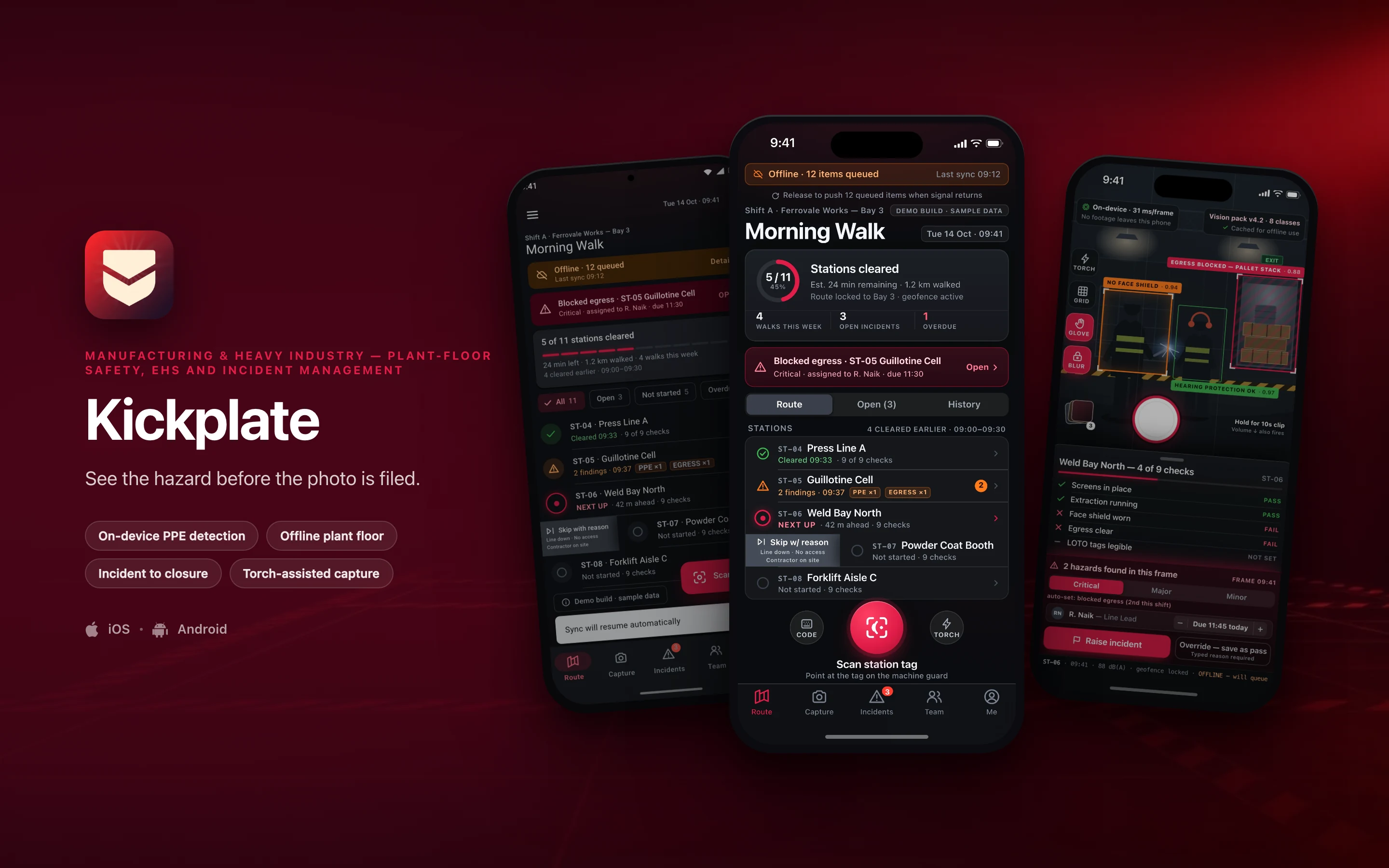
Kickplate shown on three phones — Shift Walk · Route, Live Capture · ST-06 Weld Bay North, Shift Walk · Route (Material 3) — on a manufacturing & heavy industry brand backdrop
// platforms

Two native designs, one shared core

Kickplate is designed twice — once in the iOS idiom and once in Material 3 — rather than one layout wrapped twice for both stores.

DimensioniOSAndroid
Specced againstSwift · SwiftUIKotlin · Jetpack Compose
Design languageThe Apple platform idiomMaterial 3, redesigned rather than skinned
Screens in this set21
// screens

3 screens, taken far enough to be judged

2 in the iOS idiom and 1 redesigned in Material 3 — the same feature rebuilt, not the same layout skinned. Everything inside the frames is fictional demo data.

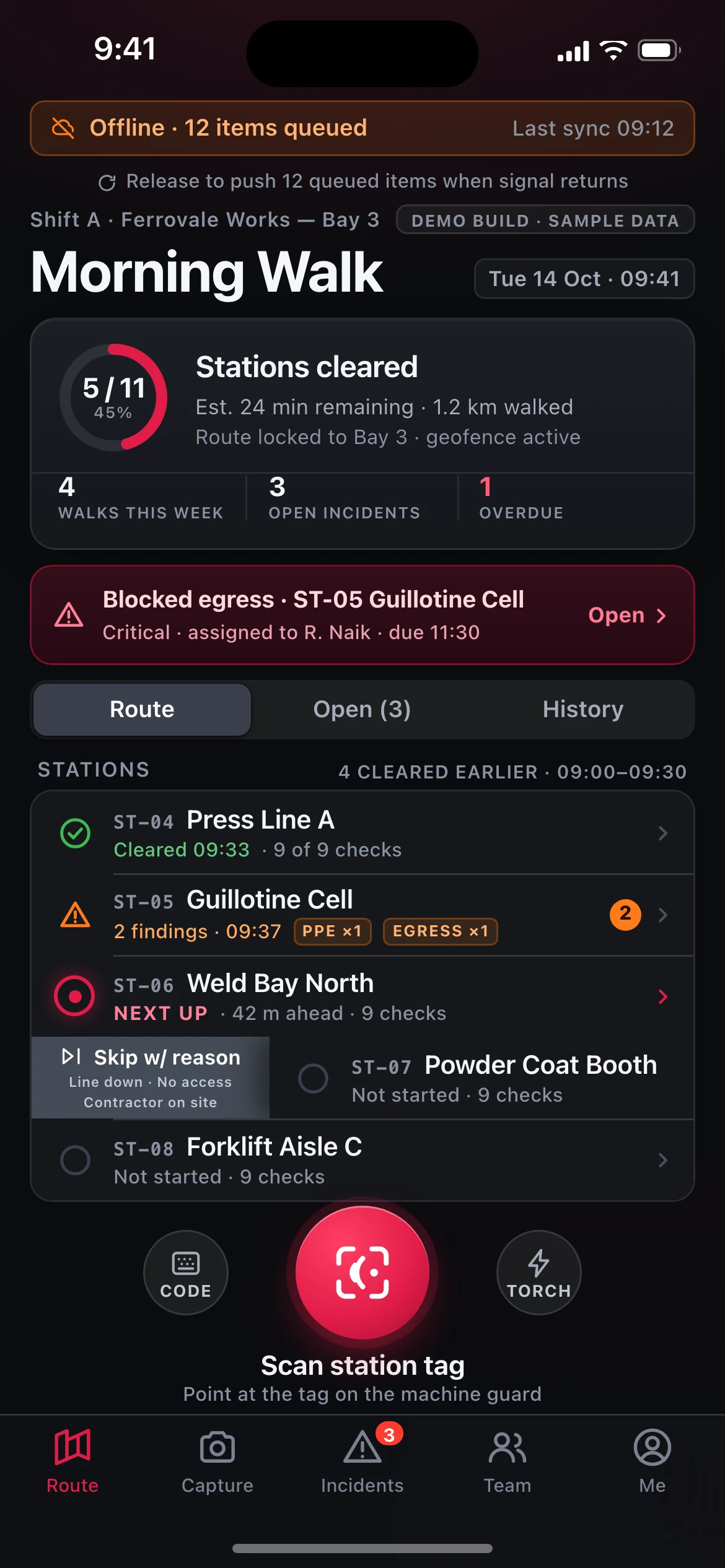
Kickplate — the Shift Walk · Route screen, running on iOS
01iOS

Shift Walk · Route

The supervisor's home screen mid-walk: sticky offline strip (12 items queued, last sync 09:12), a 45% progress ring at 5 of 11 stations cleared, the critical blocked-egress banner for ST-05, a three-up stat strip, and the station list from ST-04 to ST-08 with a leading swipe revealing "Skip w/ reason".

A persistent circular scan-tag action sits above the tab bar.
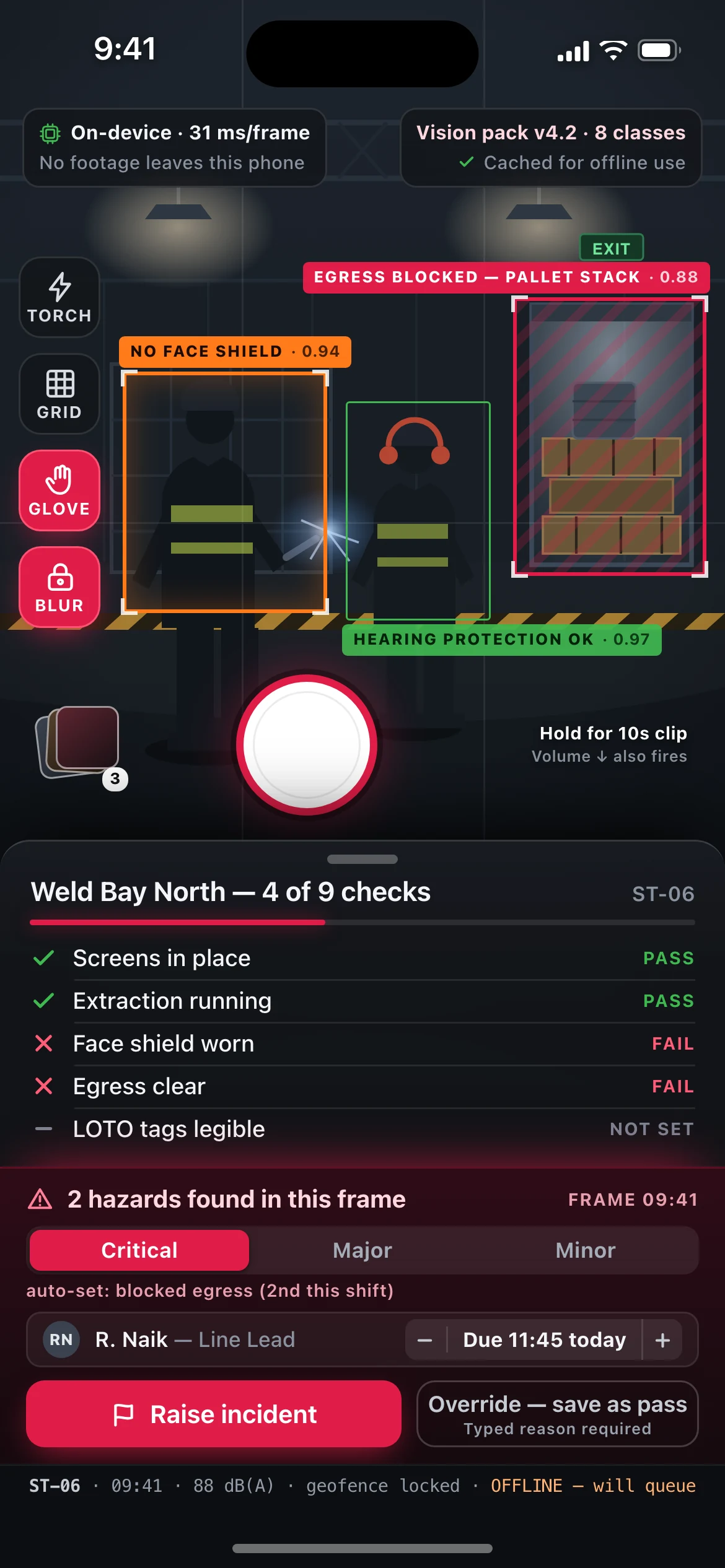
Kickplate — the Live Capture · ST-06 Weld Bay North screen, running on iOS
02iOS

Live Capture · ST-06 Weld Bay North

The full-bleed viewfinder with three live detections drawn on the frame (missing face shield 0.94, blocked egress 0.88, hearing protection OK 0.97), the on-device latency chip, the glove/blur control rail, the station checklist sheet at 4 of 9 checks with both fails traced back to a detection, and the post-capture confirm bar that turns two hazards into a Critical incident assigned to R. Naik, due 11:45.

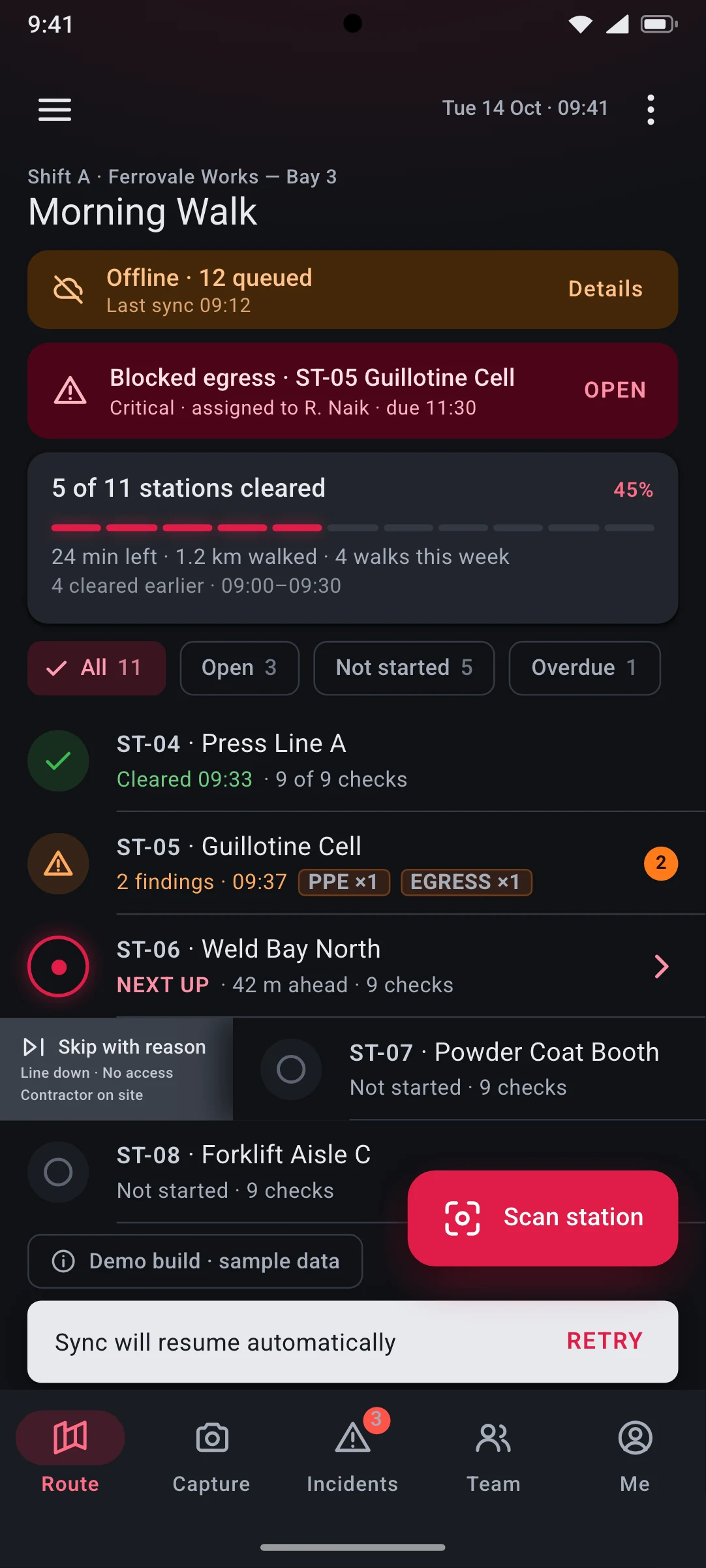
Kickplate — the Shift Walk · Route (Material 3) screen, running on Android
03Android

Shift Walk · Route (Material 3)

The same route screen and the same demo data rebuilt in Jetpack Compose grammar:

large top app bar, tonal offline banner, error-container critical card, elevated card with a segmented linear progress indicator, filter chips, M3 list items with swipe-to-dismiss, extended FAB, snackbar and navigation bar with the pill active indicator.

Dynamic colour is deliberately disabled so the hi-vis warning hues are never re-tinted by a user's wallpaper.

// why native

Why a wrapped web app cannot do this

6 capabilities Kickplate is designed around. Each is an operating-system entitlement or a hardware path a browser tab either cannot reach or cannot be trusted to hold.

Design intent, not shipped implementation. Each line describes the target architecture this build is specced against.

Real-time detection on the preview buffer
An INT8-quantised 8-class detector targets ~30 fps against the camera stream via AVFoundation + Core ML on the Apple Neural Engine and CameraX ImageAnalysis + TFLite with the NNAPI/GPU delegate on Android. Frames are scored and dropped in memory. A browser cannot reach the preview buffer at that frame rate, and shipping frames to a server would break both the latency budget and the promise that no footage leaves the phone.
Station binding over NFC
Core NFC background tag reading (and CameraX/ML Kit QR decode as the fallback) binds every capture to the physical tag bolted to the machine guard, so a check cannot be filed against the wrong press line. There is no web API for background NFC on iOS.
Genuinely offline, for days
Encrypted SQLite — GRDB on iOS, Room on Android — behind a durable outbox with last-writer-wins plus vector-clock merge. A five-day shift pattern in a no-signal steel bay reconciles cleanly on the first uplink; media queues as HEIC/HEVC with resumable multipart upload. Browser storage quotas and eviction rules make this unshippable on the web.
Sensor evidence that the route was walked
Mic-derived dB(A) spot readings, ambient lux to auto-drive the torch, barometer and pedometer to show the walk was physical rather than desk-filled, and fused GPS with indoor dead-reckoning where satellites do not reach.
Hardware ergonomics for gloved hands
Physical volume-button shutter, Core Haptics / HapticFeedbackConstants confirmation patterns, oversized 64pt targets in glove mode, and a screen-brightness boost for 60,000-lux daylight at the loading-bay doors.
Privacy-preserving media pipeline
On-device face blurring before write, Secure Enclave / Android Keystore encryption at rest, EXIF scrubbed down to the station-bound geofence, and APNs/FCM plus BGTaskScheduler/WorkManager for assignment push and opportunistic background sync.
// stack

The stack it is specced against, chosen per constraint

Swift and SwiftUI on iOS, Kotlin and Jetpack Compose on Android, each side native rather than a cross-platform view layer. A target architecture, not a shipped dependency list.

The full target architecture, all 8 lines
  1. iOS: Swift 6 + SwiftUI, AVFoundation capture pipeline, Core ML on the Apple Neural Engine, Vision for face blurring, Core NFC, Core Haptics
  2. Android: Kotlin + Jetpack Compose with Material 3, CameraX ImageAnalysis, TensorFlow Lite with NNAPI and GPU delegates, ML Kit barcode scanning
  3. Shared detection core in Rust compiled to an XCFramework and an AAR, so both platforms run byte-identical pre/post-processing and NMS
  4. Offline store: encrypted SQLite via GRDB (iOS) and Room (Android), durable outbox queue, resumable multipart media upload
  5. Model pipeline: PyTorch training, ONNX export, INT8 post-training quantisation to Core ML and TFLite, versioned 'vision packs' shipped over-the-air and cached for offline use
  6. Backend: Go services on Postgres with S3-compatible object storage, mTLS device certs, signed URLs for evidence media
  7. Notifications and background work: APNs + FCM, BGTaskScheduler (iOS) and WorkManager (Android)
  8. Delivery: Xcode Cloud + Gradle on GitHub Actions, TestFlight and Play internal testing, on-device event log exported via OpenTelemetry
// next

Working on something shaped like this?

Kickplate is a design build, so there is nothing to buy on this page. If your team has a problem that needs this kind of depth — offline for a full shift, real sensors, work that has to happen with the screen off — tell us about it and we will tell you honestly whether we are the right people to build it.