
All mobile builds// design build

Plantroom

Manufacturing & industrial — field service and equipment maintenance (HVAC, lifts, refrigeration, telecom)

Parts, readings and sign-off before you leave site.

What this is

  • A design build, not a compiled app. Plantroom is a screen set plus a target architecture. The screens are hand-built and captured; no Swift or Kotlin source exists behind them, and it is not on a store.
  • Nobody commissioned it. We designed it in-house to show how we approach native mobile. It is not a client engagement — paid client work sits on the portfolio.
  • Every name, record and figure in these screens is fictional. All of it was invented as demo data.

Plantroom is an offline-first field service app for technicians who service HVAC, refrigeration, lift and telecom plant. It hands the engineer the day's dispatched jobs, walks them through a structured on-site form — readings, pass/fail tasks, parts pulled from van stock, before/after photos, customer signature — and closes the work order on the device, syncing it the moment signal returns. It is built for the people who spend their day in basements and plant rooms, and for the dispatch and billing teams waiting on their paperwork.

  • Offline work orders
  • Van stock
  • Signature capture
  • NFC asset tags
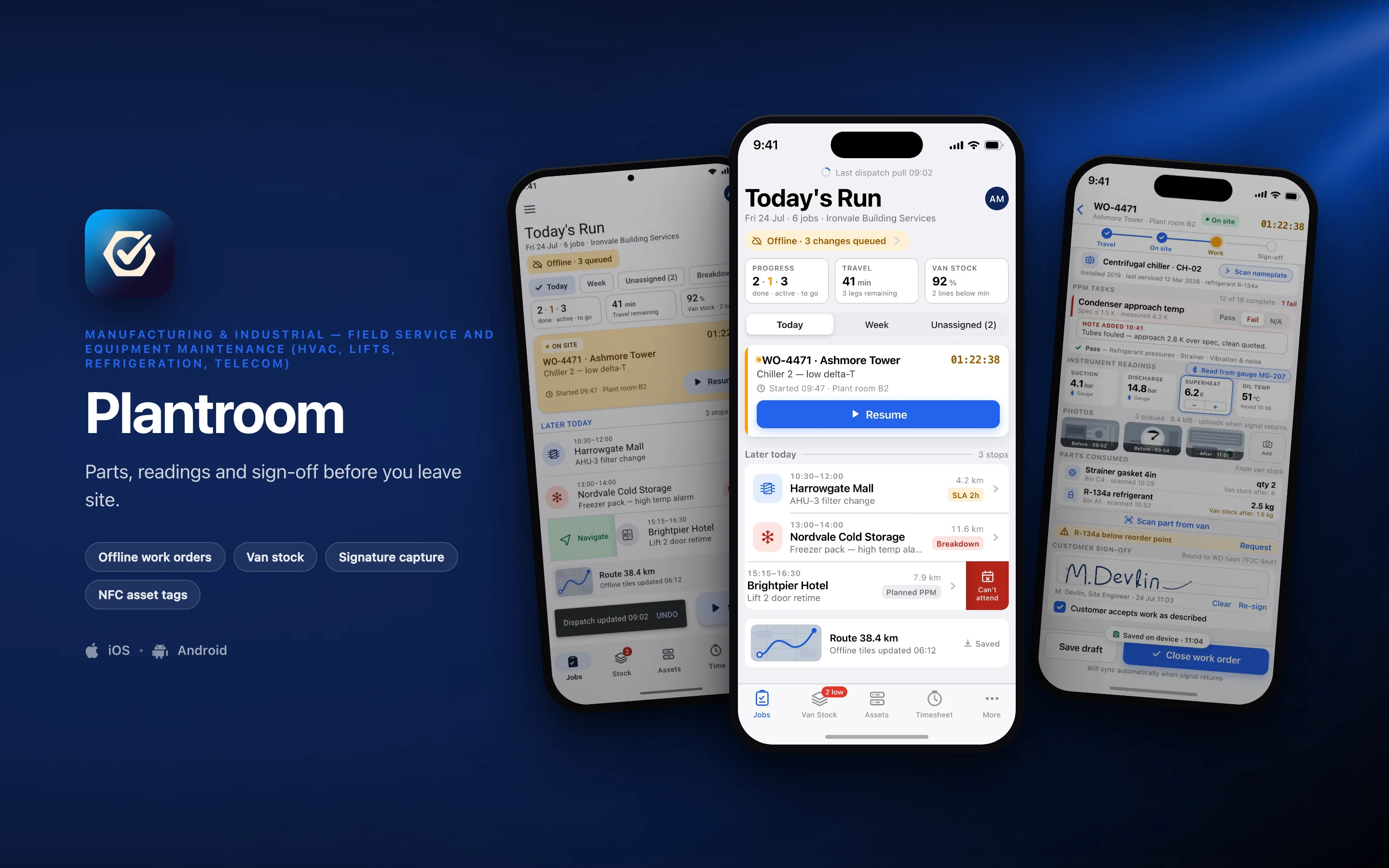
Plantroom shown on three phones — Today's Run, WO-4471 at Ashmore Tower, Today's Run, in Material 3 — on a manufacturing & industrial brand backdrop
// platforms

Two native designs, one shared core

Plantroom is designed twice — once in the iOS idiom and once in Material 3 — rather than one layout wrapped twice for both stores.

DimensioniOSAndroid
Specced againstSwift · SwiftUIKotlin · Jetpack Compose
Design languageThe Apple platform idiomMaterial 3, redesigned rather than skinned
Screens in this set21
// screens

3 screens, taken far enough to be judged

2 in the iOS idiom and 1 redesigned in Material 3 — the same feature rebuilt, not the same layout skinned. Everything inside the frames is fictional demo data.

Plantroom — the Today's Run screen, running on iOS
01iOS

Today's Run

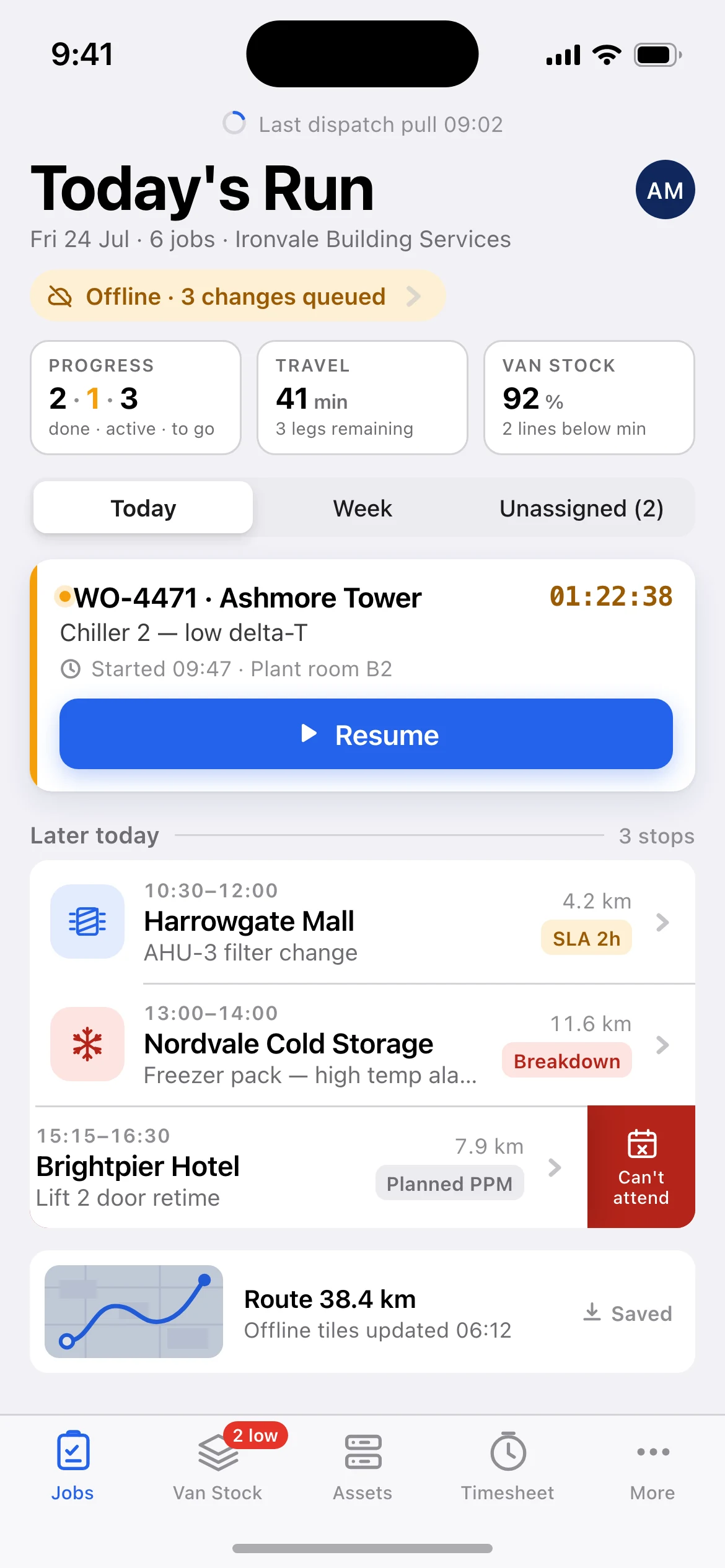
Today's Run, the job queue the technician opens in the van:

offline sync state with three queued changes, the day's progress, travel and van-stock summary, the running WO-4471 job with its live on-site timer, the three remaining stops with SLA, breakdown and PPM priority, the last stop swiped open to its red Can’t attend action, and the offline route card.
Plantroom — the WO-4471 at Ashmore Tower screen, running on iOS
02iOS

WO-4471 at Ashmore Tower

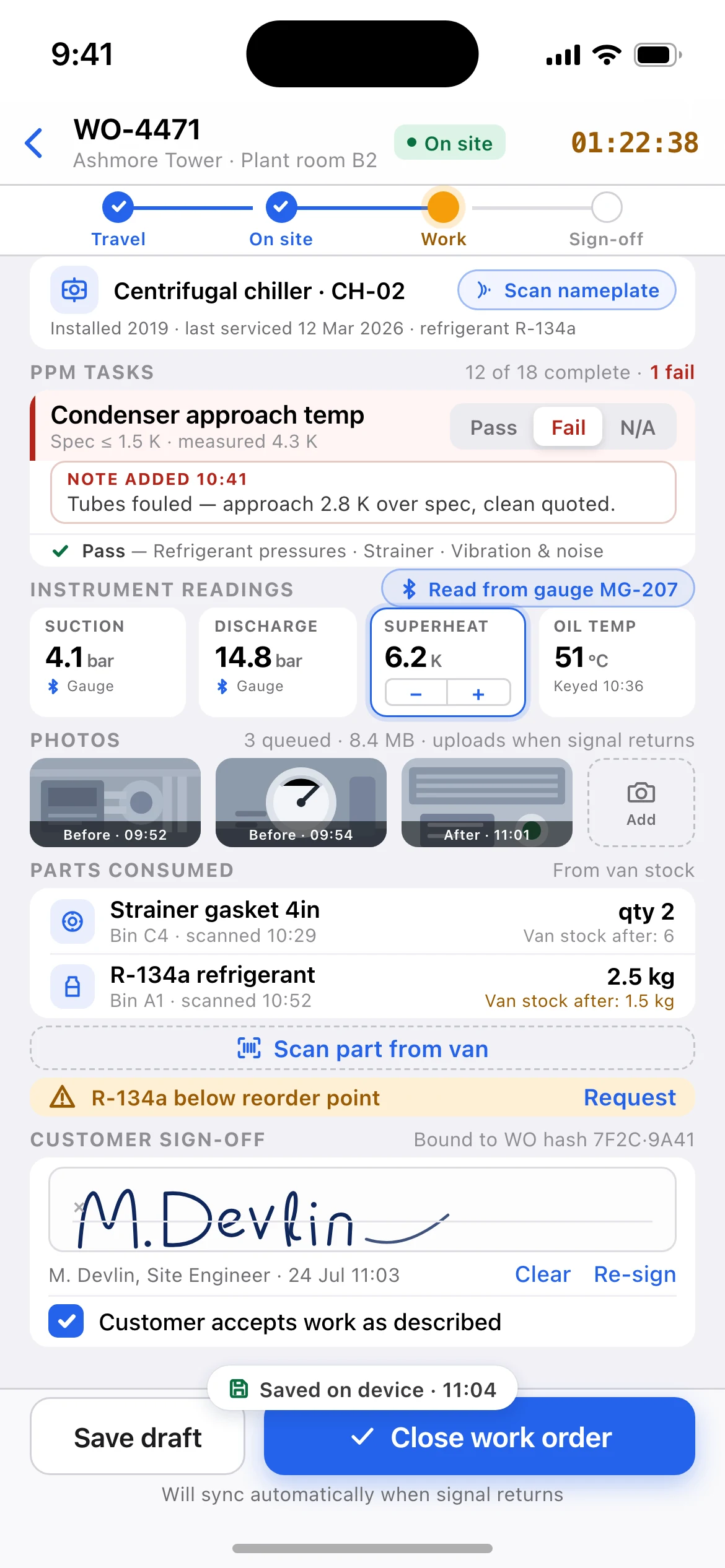
WO-4471 at Ashmore Tower, scrolled to the work and sign-off half of the structured form:

the asset the job was raised against — centrifugal chiller CH-02, with an NFC scan-nameplate action — the failed condenser approach temp task with its three-way Pass/Fail/N-A picker and auto-revealed note, the four instrument readings taken off the paired manifold gauge, before/after photo evidence queued for upload, parts consumed from van stock with the resulting stock levels and a reorder warning, and the captured customer signature above the close-out bar.

Plantroom — the Today's Run, in Material 3 screen, running on Android
03Android

Today's Run, in Material 3

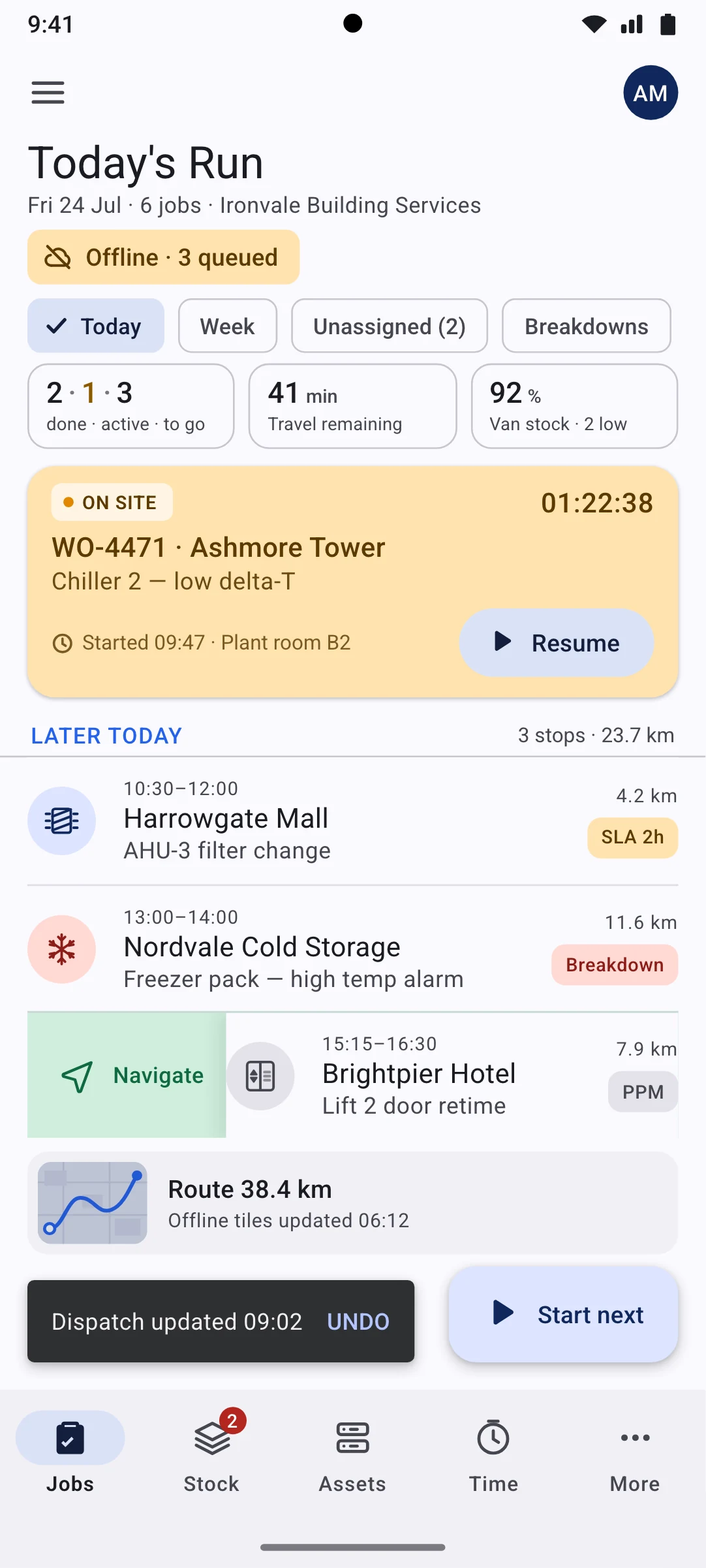
the same job queue and the same demo data as the iOS home screen, rebuilt in Material 3:

large top app bar, tonal assist and filter chips, outlined stat cards, an elevated tertiary-container active job card, three-line list items with a swipe-to-dismiss leave-behind, an extended FAB, a snackbar confirming the dispatch pull with an UNDO action, and a navigation bar with a pill indicator.

// why native

Why a wrapped web app cannot do this

7 capabilities Plantroom is designed around. Each is an operating-system entitlement or a hardware path a browser tab either cannot reach or cannot be trusted to hold.

Design intent, not shipped implementation. Each line describes the target architecture this build is specced against.

Four hours with no signal has to produce a complete work order
Every edit, reading, photo and signature is written to an on-device SQLDelight store behind an append-only outbox, then replayed through a conflict-resolved delta sync. A browser cache cannot hold a day of evidence through app kills and reboots.
Uploads have to survive the app being killed and the phone rebooting
A 12MB before/after photo batch is handed to WorkManager expedited jobs on Android and to BGProcessingTaskScheduler plus URLSession background transfers on iOS, with resumable multipart so a dropped 4G handover does not restart the upload.
The signature is a legal artefact, not an image
Capture runs on a Metal/Skia canvas at 120Hz with pressure and palm rejection, and exports both the stroke vector data and a flattened PNG bound to a hash of the work order — impossible to do faithfully in a web canvas on a gloved hand.
Readings come off the instruments, not the keyboard
BLE GATT pairing with refrigerant manifold gauges and clamp meters streams live pressure, temperature and current straight into the reading fields, removing the transcription errors that make PPM data worthless.
Scanning is how stock and assets are identified
On-device Data Matrix, QR and Code128 scanning through MLKit Barcode Scanning and VisionKit's DataScannerViewController handles van-stock bin pulls and dim, oily equipment nameplates, with torch control; Core NFC and Android NFC read asset plates to open the right equipment record directly.
Travel versus on-site time is recorded without anyone tapping anything
Geofenced arrival and departure stamping uses CoreLocation significant-location-change and the Android Geofencing API, so labour lines are accurate even with no network.
Routing has to work in a dead zone
MapLibre vector tile packs are downloaded overnight so the day's route and site maps render underground.
// stack

The stack it is specced against, chosen per constraint

Swift and SwiftUI on iOS, Kotlin and Jetpack Compose on Android, with the domain logic written once and consumed by both. A target architecture, not a shipped dependency list.

The full target architecture, all 8 lines
  1. Kotlin Multiplatform for the shared domain layer, sync engine and offline conflict resolution
  2. SwiftUI on iOS 17+ and Jetpack Compose with Material 3 on Android — fully native UI on each platform, no shared view layer
  3. SQLDelight local store with an append-only outbox table and last-writer-wins field merge with server-side reconciliation for stock counts
  4. Ktor client over HTTPS with Protobuf payloads and resumable tus-style multipart for photo and signature upload
  5. WorkManager expedited workers on Android; BGProcessingTaskScheduler plus URLSession background transfers on iOS
  6. MLKit Barcode Scanning and Apple VisionKit DataScanner for van-stock bins and equipment nameplates; Core NFC and Android NFC for asset tags
  7. MapLibre Native with pre-downloaded offline vector tile packs for routing and site maps in dead zones
  8. PostgreSQL with PostGIS and per-device sync cursors behind a containerised Go dispatch service, object storage for evidence media
// next

Working on something shaped like this?

Plantroom is a design build, so there is nothing to buy on this page. If your team has a problem that needs this kind of depth — offline for a full shift, real sensors, work that has to happen with the screen off — tell us about it and we will tell you honestly whether we are the right people to build it.