All mobile builds// design build

Sevline

DevOps & SRE — on-call incident response

Ring through silence. Ack in one tap.

What this is

  • A design build, not a compiled app. Sevline is a screen set plus a target architecture. The screens are hand-built and captured; no Swift or Kotlin source exists behind them, and it is not on a store.
  • Nobody commissioned it. We designed it in-house to show how we approach native mobile. It is not a client engagement — paid client work sits on the portfolio.
  • Every name, record and figure in these screens is fictional. All of it was invented as demo data.

Sevline is an on-call incident response app for SaaS engineering and support teams. A SEV1 page rings at forced volume through the Silent switch and Do Not Disturb, acknowledging or escalating takes one tap from the lock screen, and every responder works from one shared live timeline with the runbook executable inline. It is built for the primary and secondary responders on a rotation — the people whose phone is the last line of defence at 02:17 — plus the engineering managers who get escalated to when nobody picks up.

  • Breaks through silent
  • One-tap ack
  • Live incident timeline
  • Rotation handover
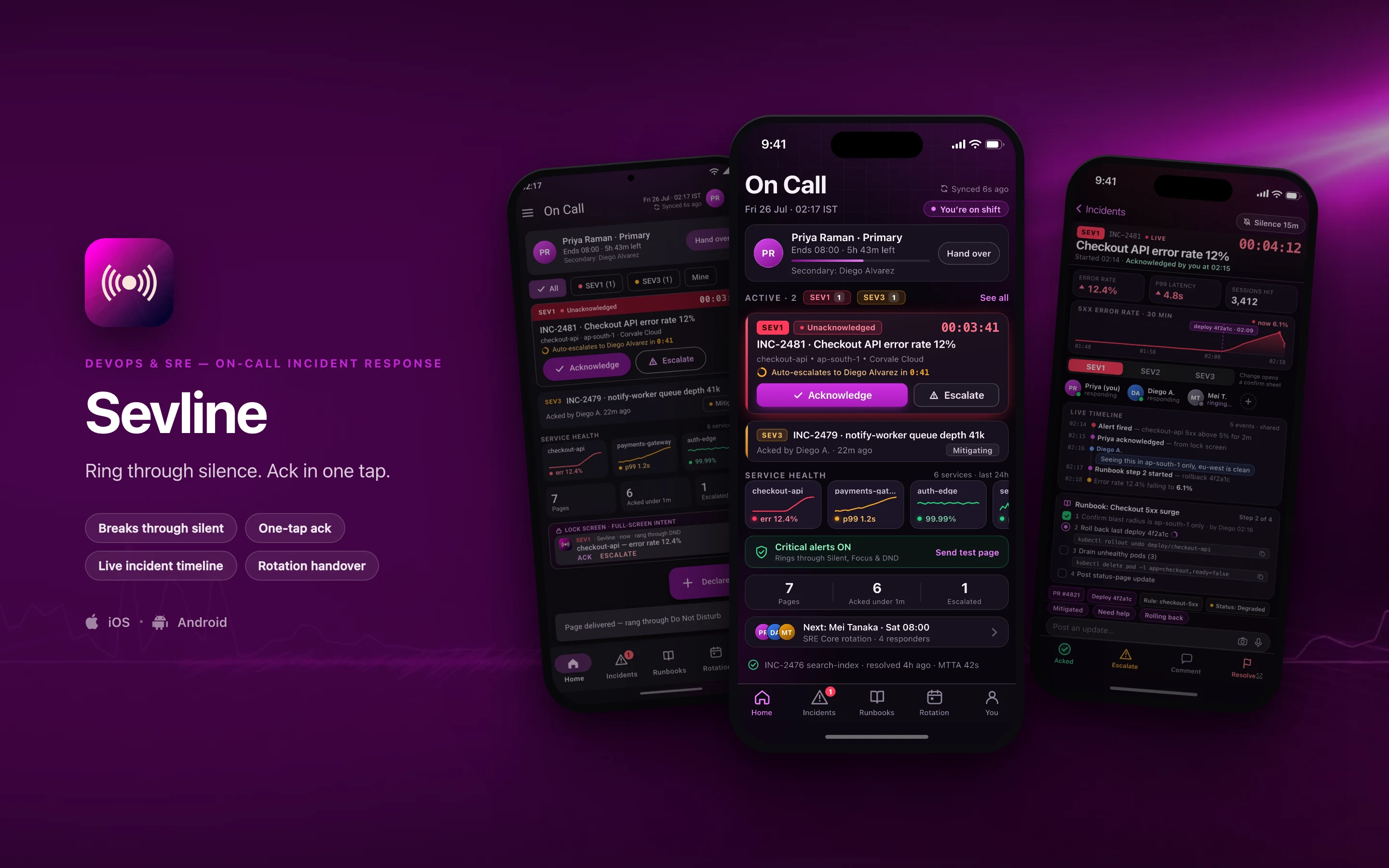
Sevline shown on three phones — On Call, INC-2481, the incident room, On Call in Material 3 — on a devops & sre brand backdrop
// platforms

Two native designs, one shared core

Sevline is designed twice — once in the iOS idiom and once in Material 3 — rather than one layout wrapped twice for both stores.

DimensioniOSAndroid
Specced againstSwift · SwiftUIKotlin · Jetpack Compose
Design languageThe Apple platform idiomMaterial 3, redesigned rather than skinned
Screens in this set21
// screens

3 screens, taken far enough to be judged

2 in the iOS idiom and 1 redesigned in Material 3 — the same feature rebuilt, not the same layout skinned. Everything inside the frames is fictional demo data.

Sevline — the On Call screen, running on iOS
01iOS

On Call

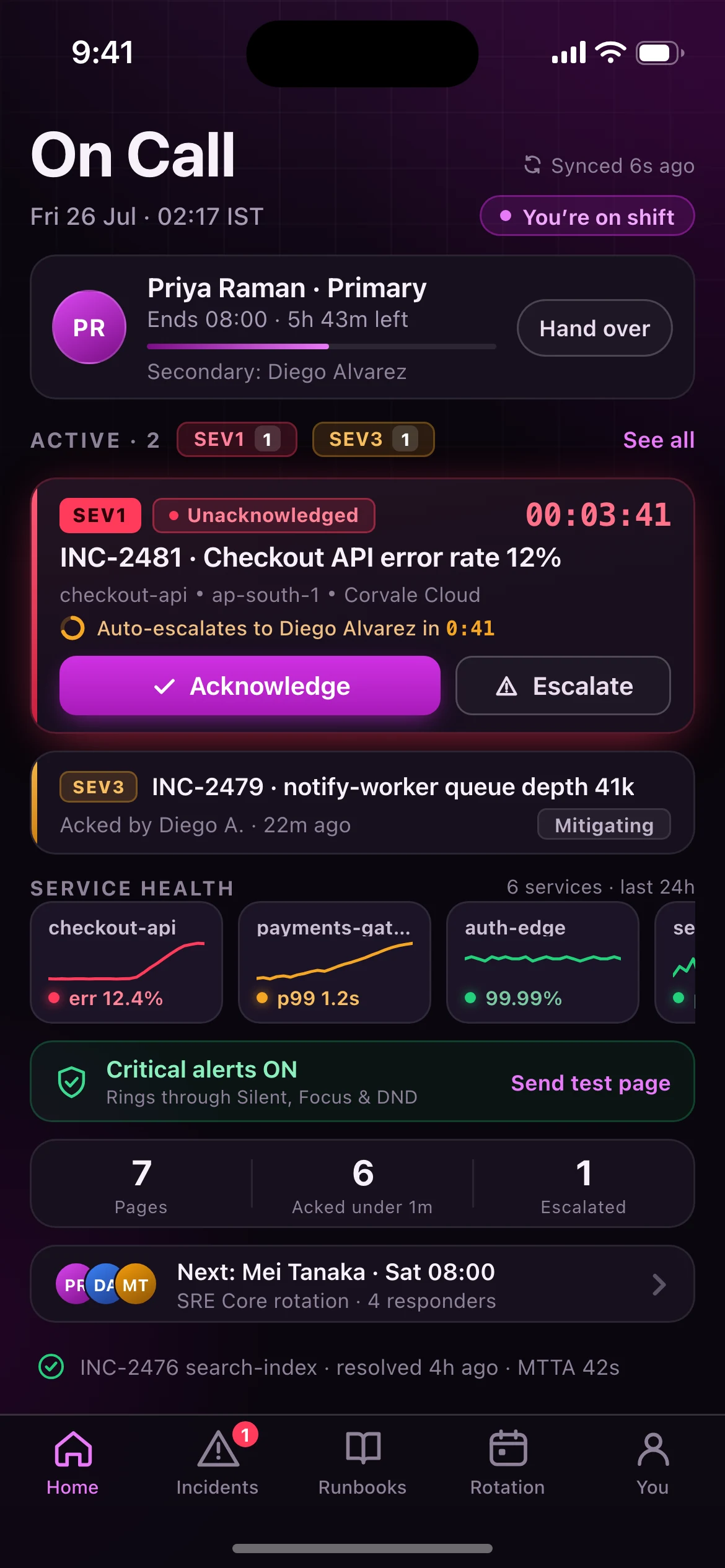
The landing screen at 02:17: shift card with handover, an unacknowledged SEV1 (INC-2481, live elapsed timer, auto-escalation countdown to the secondary, inline Acknowledge / Escalate), a mitigating SEV3, a scrolling six-service health strip with sparklines, the critical-alert delivery assurance banner with a test page, last-24h paging stats, the next rotation handoff and the most recent resolved incident.

Pull-to-refresh reports "Synced 6s ago"; when the radio drops it is replaced by a persistent amber "Offline — 2 updates queued" chip.
Sevline — the INC-2481, the incident room screen, running on iOS
02iOS

INC-2481, the incident room

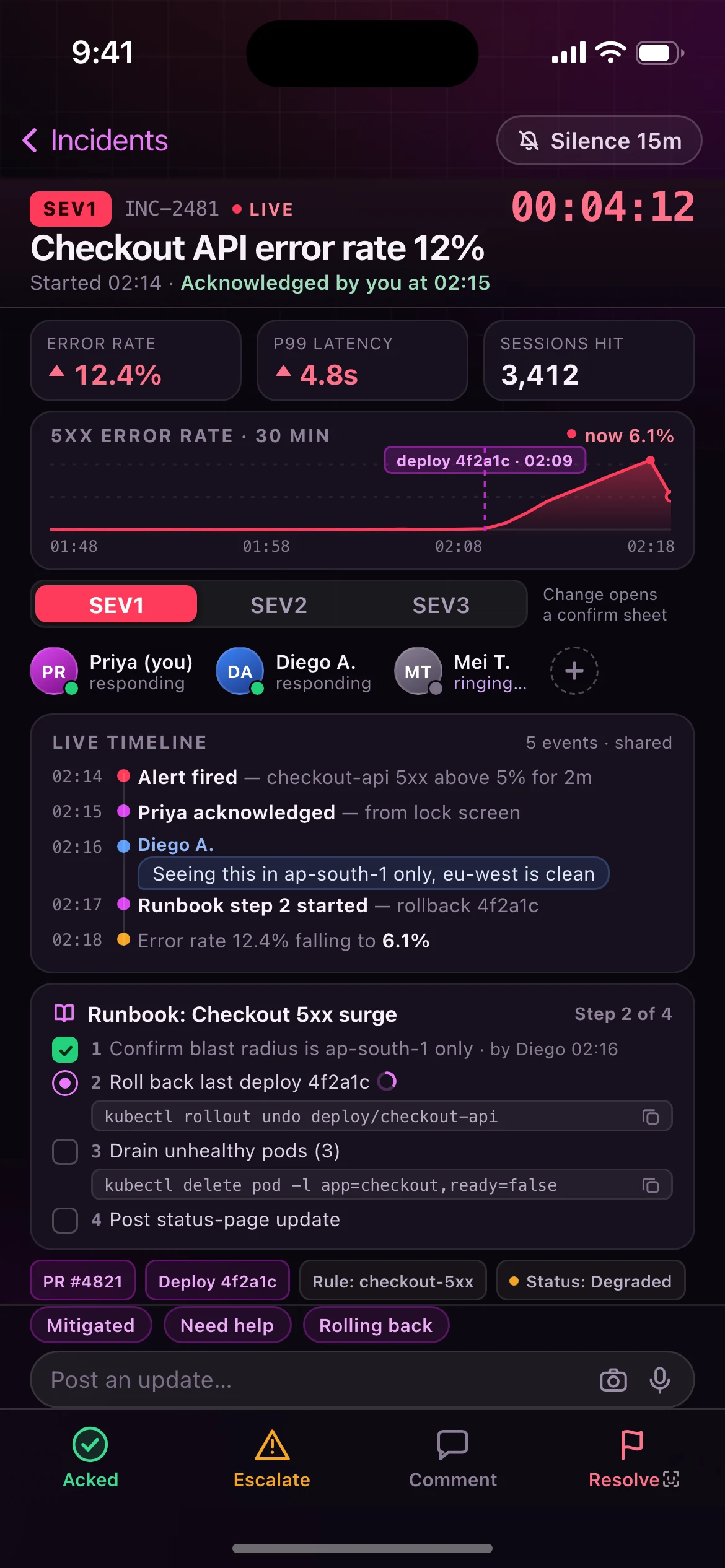
Sticky header with severity, the running clock and who acknowledged; impact tiles; a 30-minute error-rate chart with the suspect deploy marked inline; severity segmented control; responder row with a ringing escalation target; the shared live timeline; the runbook with copyable commands per step; linked context; a docked composer and a pinned Ack / Escalate / Comment / Resolve action bar.

Two further states are designed but not captured in this frame, because both replace or cover the acknowledged layout shown here: the pre-acknowledgement header, where a 60-second violet countdown ring wraps a hold-to-confirm Acknowledge button under the caption "Escalates to Diego Alvarez in 0:41"; and the Escalate half-sheet, listing the secondary, the engineering manager, the whole rotation and a war-room bridge, each with a call glyph behind a red "Wake them now" confirm.

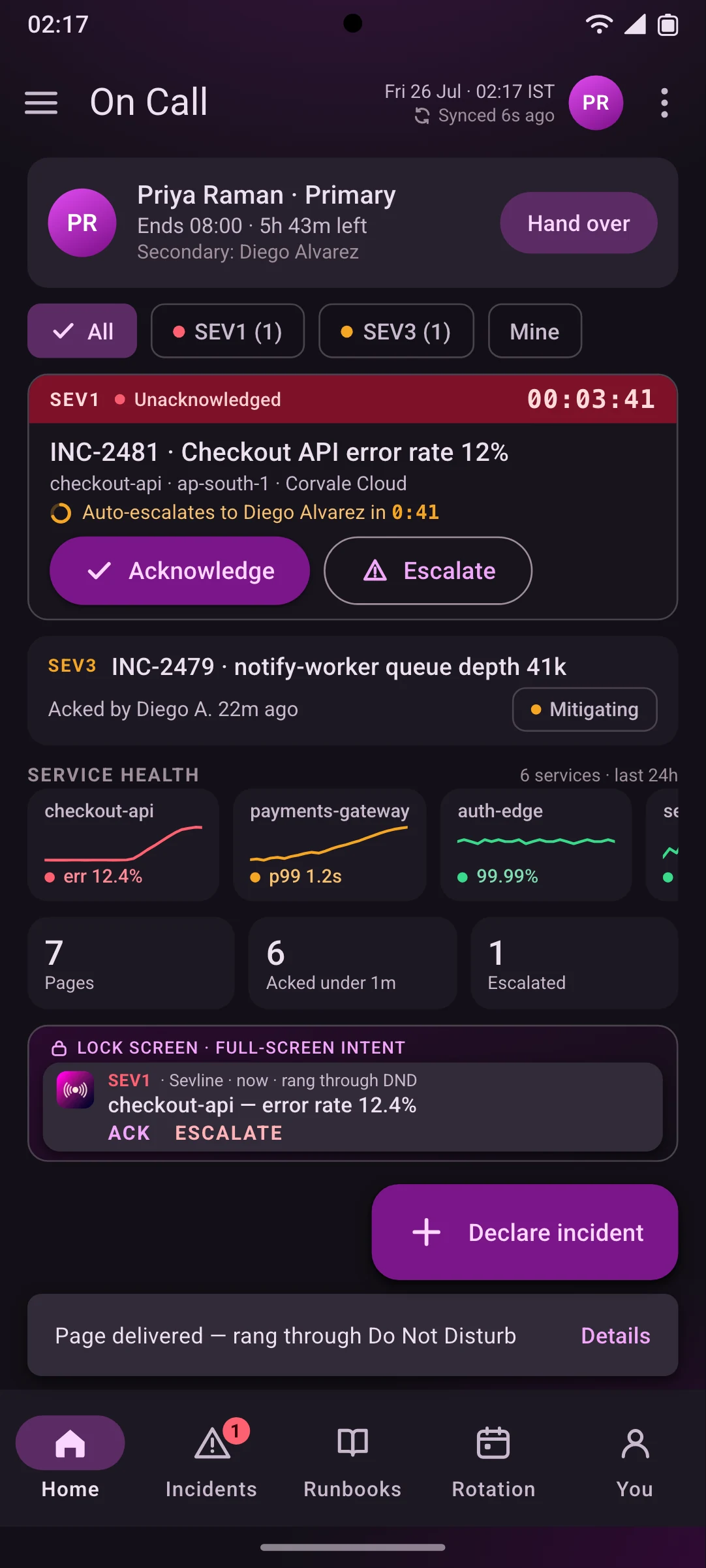
Sevline — the On Call in Material 3 screen, running on Android
03Android

On Call in Material 3

The same feature and the same shared records as the iOS home screen — the same incidents, the same shift, the same six services and the same 24-hour numbers — rebuilt with Android idioms: top app bar, filter chips, an outlined SEV1 card with an error-container header strip, filled cards, an extended FAB, a snackbar confirming the page rang through Do Not Disturb, and a navigation bar with an active-indicator pill.

It also previews the lock-screen full-screen-intent page with its ACK and ESCALATE notification actions. A NavigationRail replaces the navigation bar on tablets and unfolded foldables; predictive back scales the incident detail away to reveal this list. Dynamic colour may retint neutrals and containers, but severity semantics and the brand violet are pinned — red is SEV1, amber is degraded, green is healthy, whatever the wallpaper says.

// why native

Why a wrapped web app cannot do this

7 capabilities Sevline is designed around. Each is an operating-system entitlement or a hardware path a browser tab either cannot reach or cannot be trusted to hold.

Design intent, not shipped implementation. Each line describes the target architecture this build is specced against.

Critical alerts that bypass Silent and Focus
iOS grants UNNotificationInterruptionLevel.critical by entitlement only; it is the sole way a notification rings at forced volume with the ringer switch off. There is no web equivalent, and a page that does not wake you is not a page.
Full-screen-intent notifications on a bypassDnd channel
On Android the page takes over the lock screen with USAGE_ALARM audio, backed by SCHEDULE_EXACT_ALARM and a foreground service so escalation timers keep counting through Doze.
Re-ringing as a real phone call
PushKit + CallKit on iOS and ConnectionService on Android turn an unacknowledged page into a system call after 60 seconds — it appears in the native call UI, rings like a call, and survives a locked screen.
Lock-screen actions with biometric gating
Acknowledge fires straight from the notification without unlocking; Escalate and Resolve require Face ID / BiometricPrompt, so nothing destructive is triggered by a pocket tap.
Live Activity and Dynamic Island
ActivityKit on iOS and an ongoing foreground notification on Android keep the elapsed incident timer and current ack state on screen without the app being open.
Offline-first append-only event log
An SQLite (WAL) store lets timeline posts and runbook step checks be written on tunnel LTE or in airplane mode, then replayed in causal order by BGTaskScheduler / WorkManager when signal returns.
Wrist targets with a haptic escalation ladder
Apple Watch and Wear OS companions play a distinct taptic pattern per severity, so a SEV1 is identifiable without looking at anything.
// stack

The stack it is specced against, chosen per constraint

Swift and SwiftUI on iOS, Kotlin and Jetpack Compose on Android, with the domain logic written once and consumed by both. A target architecture, not a shipped dependency list.

The full target architecture, all 8 lines
  1. Swift 6 / SwiftUI on iOS 18+, with the UserNotifications critical-alert entitlement, ActivityKit Live Activities and PushKit/CallKit re-ring
  2. Kotlin 2.1 / Jetpack Compose with Material 3 on Android 15, using full-screen-intent notifications, bypassDnd channels and a foreground escalation service
  3. Kotlin Multiplatform shared domain module holding the incident state machine, escalation policy and rotation maths so both platforms behave identically
  4. SQLDelight over SQLite (WAL) for the offline-first event log, with Ktor client and background replay via BGTaskScheduler and WorkManager
  5. APNs (critical + VoIP tokens) and Firebase Cloud Messaging high-priority delivery, with per-device delivery receipts to prove a page landed
  6. Go paging and escalation service on Kubernetes, with NATS JetStream fanning alert events out to responder devices
  7. PostgreSQL with an append-only event-sourced incident timeline and derived read models for service health
  8. Realtime timeline sync over WebSocket with SSE fallback, plus Apple Watch and Wear OS companion targets
// next

Working on something shaped like this?

Sevline is a design build, so there is nothing to buy on this page. If your team has a problem that needs this kind of depth — offline for a full shift, real sensors, work that has to happen with the screen off — tell us about it and we will tell you honestly whether we are the right people to build it.