
All mobile builds// design build

Tapstub

Fintech — corporate cards & spend management

Tap the card. Catch the receipt.

What this is

  • A design build, not a compiled app. Tapstub is a screen set plus a target architecture. The screens are hand-built and captured; no Swift or Kotlin source exists behind them, and it is not on a store.
  • Nobody commissioned it. We designed it in-house to show how we approach native mobile. It is not a client engagement — paid client work sits on the portfolio.
  • Every name, record and figure in these screens is fictional. All of it was invented as demo data.

Tapstub is a corporate card and spend-management app for the people who actually carry the card. The moment a card is swiped, an authorization push lands on the employee's phone, they snap the receipt in the notification, and the expense codes itself against policy before they've left the counter. Finance and line managers use the same app from the other side: a queue of coded expenses cleared with a single biometric approval that is cryptographically signed on device.

  • Push on every swipe
  • Receipt OCR
  • Face ID approval
  • Freeze the card
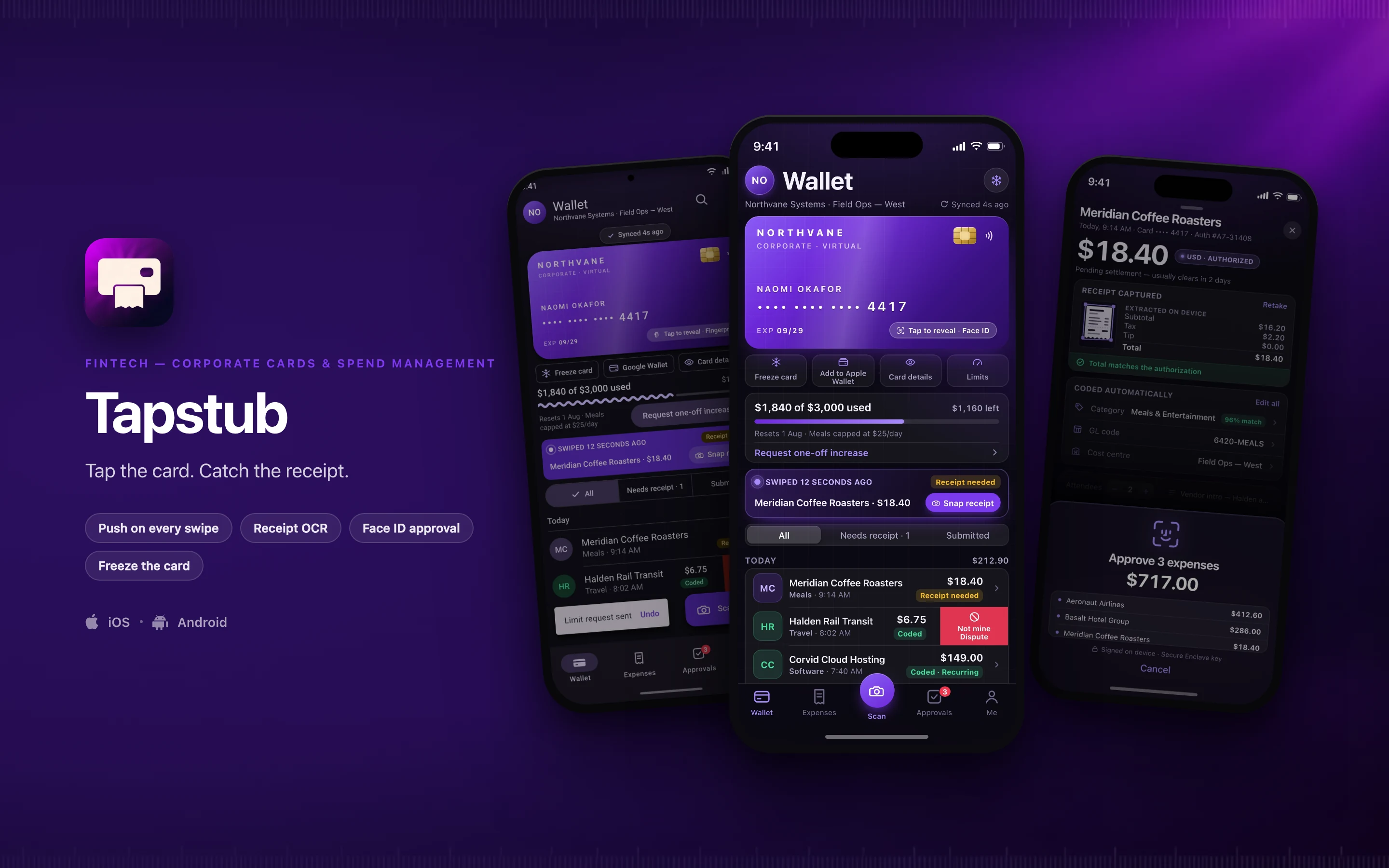
Tapstub shown on three phones — Wallet, Transaction, receipt and approval, Wallet, Material 3 — on a fintech brand backdrop
// platforms

Two native designs, one shared core

Tapstub is designed twice — once in the iOS idiom and once in Material 3 — rather than one layout wrapped twice for both stores.

DimensioniOSAndroid
Specced againstSwift · SwiftUIKotlin · Jetpack Compose
Design languageThe Apple platform idiomMaterial 3, redesigned rather than skinned
Screens in this set21
// screens

3 screens, taken far enough to be judged

2 in the iOS idiom and 1 redesigned in Material 3 — the same feature rebuilt, not the same layout skinned. Everything inside the frames is fictional demo data.

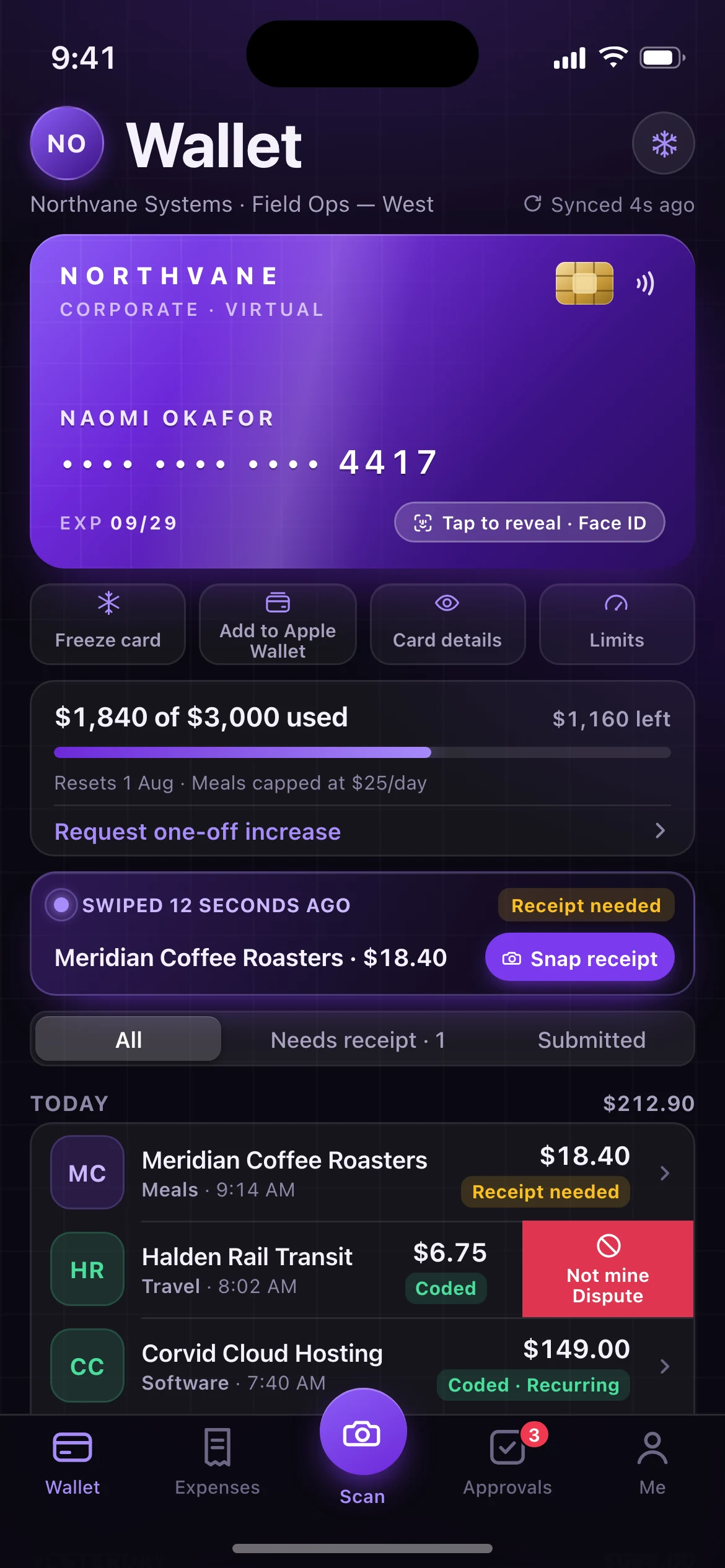
Tapstub — the Wallet screen, running on iOS
01iOS

Wallet

The employee's home: card hero with masked PAN and reveal hint, quick actions, the monthly limit at 61% of $3,000, a live "swiped 12 seconds ago" banner for the $18.40 Meridian Coffee Roasters authorization, and the day's transaction feed with per-row coding status and a row held open on its trailing "Not mine — dispute" swipe action.
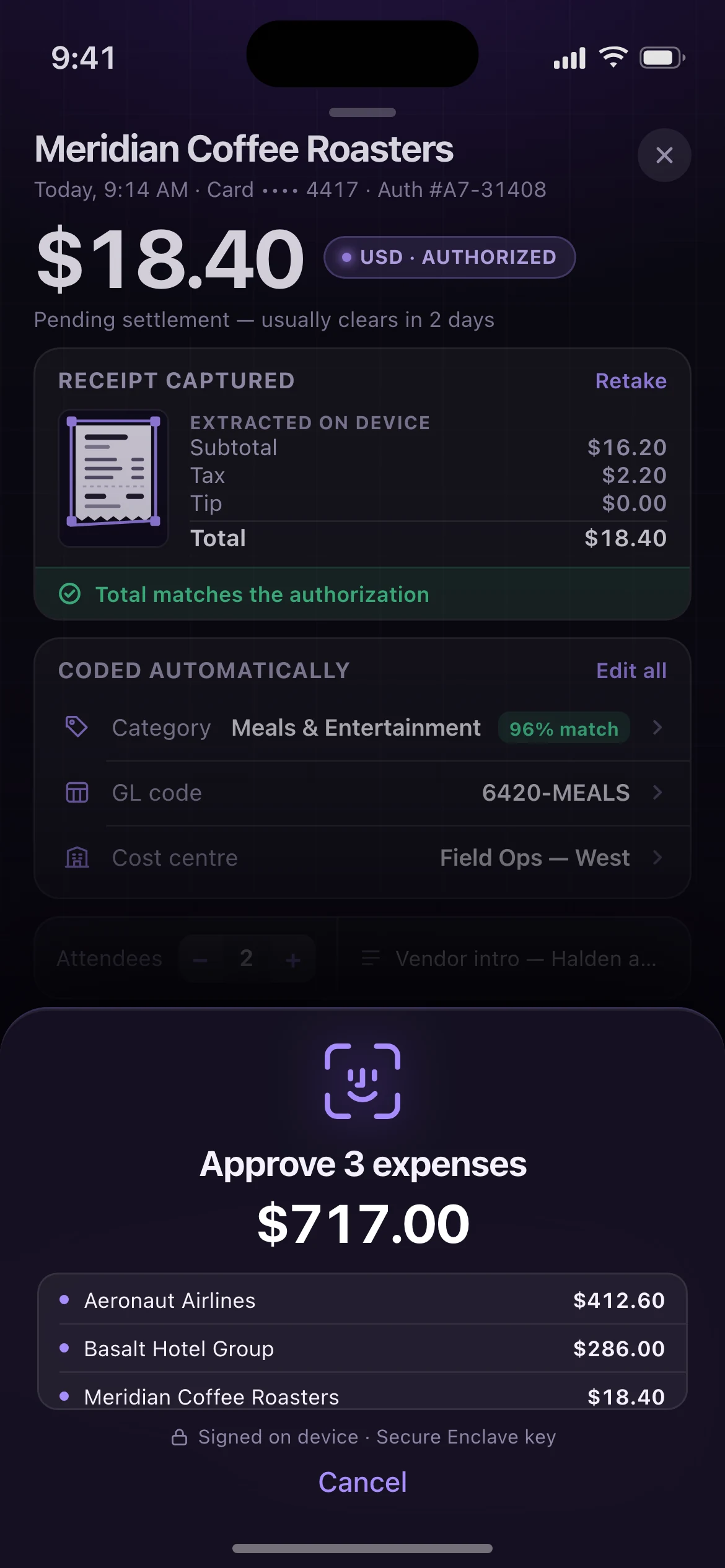
Tapstub — the Transaction, receipt and approval screen, running on iOS
02iOS

Transaction, receipt and approval

Opened from the swipe push: the amount hero, the captured receipt with its on-device extraction reconciled against the authorization, the auto-coded category, GL code and cost centre, the policy checks — under a Face ID confirmation sheet clearing three expenses worth $717.00 with a Secure Enclave signature.

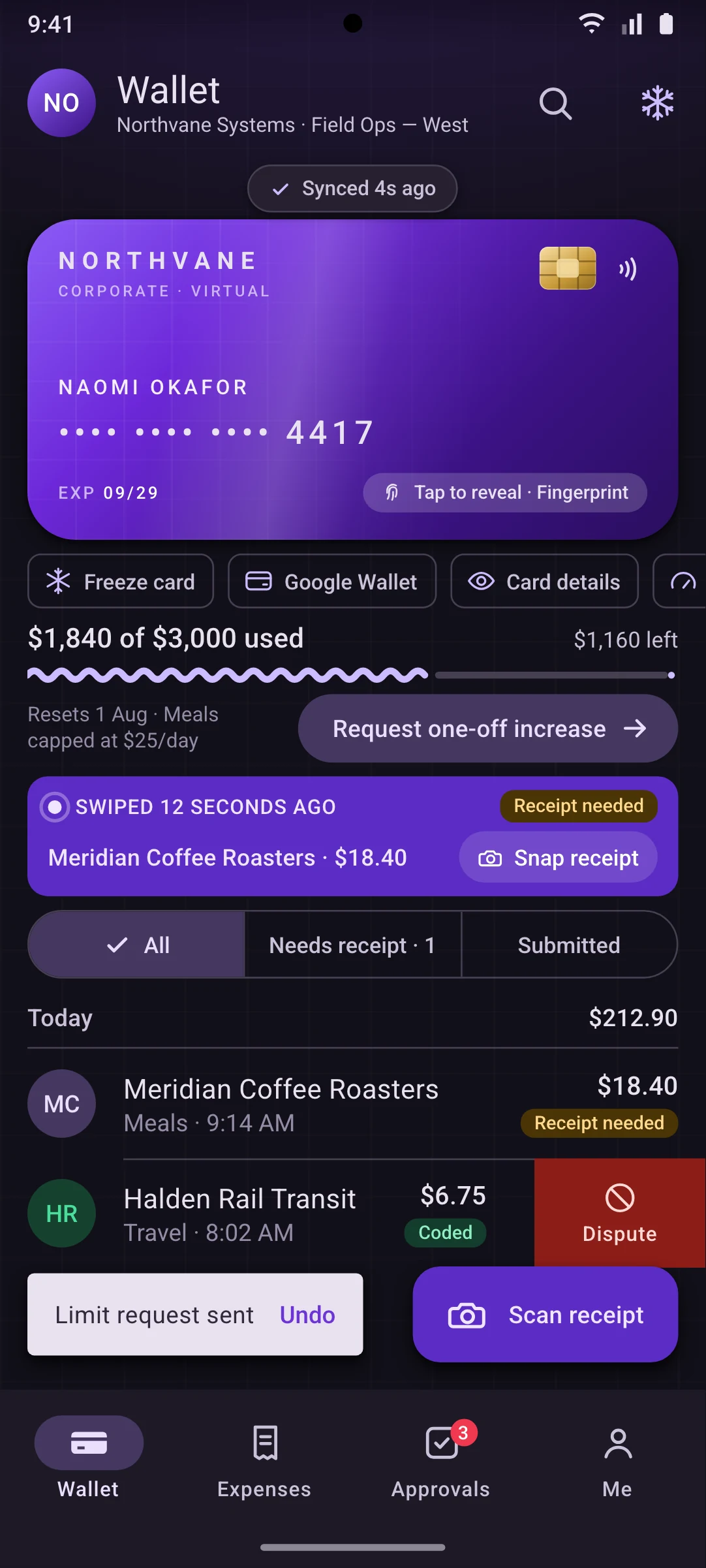
Tapstub — the Wallet, Material 3 screen, running on Android
03Android

Wallet, Material 3

The same screen and the same records rebuilt in Android idioms:

M3 top app bar, elevated card at 28dp, a horizontally scrollable assist-chip row, a wavy linear progress indicator, segmented buttons, the same list item held open on its trailing dispute action, an extended FAB for scanning, a navigation bar with a pill active indicator, and an undoable snackbar.

// why native

Why a wrapped web app cannot do this

6 capabilities Tapstub is designed around. Each is an operating-system entitlement or a hardware path a browser tab either cannot reach or cannot be trusted to hold.

Design intent, not shipped implementation. Each line describes the target architecture this build is specced against.

Sub-two-second authorization push
The alert is fired straight off the issuer-processor webhook using the APNs Time Sensitive interruption level and a matching Android high-priority notification channel, so it breaks through Focus and Do Not Disturb while the customer is still at the terminal. A web push has no interruption level and no delivery guarantee at that latency.
Wallet provisioning
Virtual cards are pushed into the device wallet through PassKit In-App Provisioning and the Google Pay Push Provisioning API, including in-app issuer terms presentment. Neither API is reachable from a browser.
On-device receipt capture
VisionKit's document camera with Vision text recognition on iOS, and the ML Kit Document Scanner on Android, do live quad edge detection, perspective correction and line-item extraction (subtotal, tax, tip, total) against the raw camera buffer. The frame buffer never leaves the handset.
Hardware-backed approval
Face ID bound to a Secure Enclave key, and BiometricPrompt bound to a StrongBox-backed Keystore key, each return a signed approval payload rather than a boolean. That signature is what makes the approval non-repudiable in an audit; a browser can only tell you a user "passed" a check.
Live Activity and Dynamic Island
A pending authorization stays on the Lock Screen and in the Dynamic Island while the amount moves from Authorized to Settled, mirrored by an Android ongoing notification whose inline Snap receipt action opens the camera without a cold app launch.
Offline-first receipt queue
Receipts captured on a plane or in a basement car park encrypt to local storage and upload later via BGProcessingTaskRequest and WorkManager, with coarse location used to match the merchant and flag geo mismatches. Background execution of that kind has no web equivalent.
// stack

The stack it is specced against, chosen per constraint

Swift and SwiftUI on iOS, Kotlin and Jetpack Compose on Android, with the domain logic written once and consumed by both. A target architecture, not a shipped dependency list.

The full target architecture, all 8 lines
  1. iOS: Swift 6 with strict concurrency, SwiftUI plus the Observation framework, ActivityKit for the pending-authorization Live Activity
  2. Android: Kotlin 2.x with Jetpack Compose and Material 3 Expressive, edge-to-edge with predictive back
  3. Kotlin Multiplatform shared domain layer — policy engine, auto-categorization rules, FX conversion and the sync state machine — compiled to both a Swift package and an AAR so a policy change ships once
  4. On-device receipt OCR: VisionKit document camera plus Vision text recognition on iOS, ML Kit Document Scanner and Text Recognition v2 on Android, behind a shared line-item parser
  5. Biometrics: LocalAuthentication with a Secure Enclave key on iOS and AndroidX BiometricPrompt with a StrongBox-backed Keystore key on Android, both signing an approval payload rather than returning a boolean
  6. Wallet provisioning: PassKit In-App Provisioning and the Google Pay Push Provisioning API against an issuer-processor sandbox
  7. Local persistence and offline queue: SQLDelight with SQLCipher, background sync via BGProcessingTask and WorkManager, transport over gRPC with protobuf
  8. Backend edge: a Kotlin/Ktor service ingesting card-network authorization webhooks and fanning out to APNs and FCM, with signed-approval verification and an append-only audit log
// next

Working on something shaped like this?

Tapstub is a design build, so there is nothing to buy on this page. If your team has a problem that needs this kind of depth — offline for a full shift, real sensors, work that has to happen with the screen off — tell us about it and we will tell you honestly whether we are the right people to build it.